Faculty Insight User Testing Group - 2025 Report
Background
In the fall 2024 semester, with the goal of developing a more effective faculty activity management tool that supports faculty evaluation and recognition efforts, Analytics, Institutional Research & Effectiveness (AIRE) and the Office of Faculty Affairs (OFA) formed a small, cross-disciplinary group of faculty to provide feedback on KU’s faculty activity management system, Faculty Insight. Members of this group were selected by the Dean of their respective school or college.
User testing group members:
Amalia Monroe-Gulick, Libraries
Arvind Tripathi, School of Business
Rémy Lequesne, School of Engineering
Elizabeth MacGonagle, College of Liberal Arts & Sciences
Utako Minai, College of Liberal Arts & Sciences
Kirsten Jensen, College of Liberal Arts & Sciences
Steve Gurysh, College of Liberal Arts & Sciences
Margaret Marco, School of Music
Ashley Herda, School of Education & Human Sciences
Jody Brook, School of Social Welfare
Chad Kraus, School of Architecture & Design
Taofeeq Ashiru, School of Professional Studies
Karen Moeller, School of Pharmacy
Hyunjin Seo, School of Journalism & Mass Communications
Kyle Velte, School of Law
Sara Wilson, School of Engineering
Over a six-month period, the members of this group attended a Faculty Insight training session led by AIRE, updated all parts of their Faculty Insight profile, participated in feedback sessions with AIRE, OFA, and other user testers, and provided detailed, constructive feedback via survey.
This report provides a summary of the feedback received from the user feedback group and the actions being taken to improve utility of Faculty Insights for faculty and unit leaders. Many current and future actions will include working alongside Academic Analytics (AcA), the developers of Faculty Insight.
The feedback collected from the faculty tester group can be organized into three main themes: Enhancement Requests, Education and Communication, and System Functionality. The entire feedback document, with individual technical concerns redacted, can be found in Appendix A.
Enhancement Requests are areas of requested improvement to the tool. These are items in which AIRE can consult with Academic Analytics to see if system changes can take place to improve the functionality of Faculty Insight. Enhancement Requests feedback have been further organized into the following development areas: Dashboard Customization, Date Field Enhancement, Duplication of Records, and Filter or Category Options.
Education and Communication includes feedback that AIRE identified as possible opportunities to create guidelines, enhance resources, and improve communication surrounding best uses and practices of Faculty Insight. A tab in the feedback document also notes whether the feedback applies to those at KU responsible for the tool, or if further collaboration is needed between KU and Academic Analytics.
System Functionality consists of other forms of feedback in which user testers identified questions or instances where clarification from Academic Analytics is requested. These items will be further discussed by AIRE, OFA, and Academic Analytics to determine the best path forward. Once a decision has been made, that information will be available on the Faculty Insight website under Quick Links and faculty will be notified periodically of updates through the OFA Monthly Newsletter.
Summary of Feedback
The user testing group identified several areas of change or improvement needed to Faculty Insight itself, including:
- The ability to duplicate existing records
- Inconsistencies of date filled requirements
- Customization options on the Home tab
- Additional filter or sorting options
- Ability to copy and paste records from an external document into Faculty Insight
- Request for new record form fields to appear all on one page
Summary of Actions
| Request or topic | Development area | Action from KU or Academic Analytics |
| Users would like the ability to duplicate or copy an existing record. | Duplication of Records | This functionality was added to Faculty Insight categories by Academic Analytics in April 2025. Example of how a user can now duplicate a record can be found in Appendix B. |
| Users commented on the inconsistencies of the date field requirements across categories. | Date Field Enhancement | Academic Analytics has been made aware of the difficulties surrounding the various date field requirements across categories. AIRE will continue to engage in conversations with Academic Analytics for solutions and communicate work-arounds to faculty during this time. |
| Users would like more options for customizing their view of the Home tab. | Dashboard Customization | Academic Analytics is open to exploring options to make this page more editable, but additional conversations are needed. |
| Users would like the option to filter or sort records by different fields in a category. | Filter or Category Options | This feedback has been discussed with Academic Analytics. Although no immediate solution was presented, AIRE and OFA will continue to engage in discussions around possible options. |
| Users requested the ability to copy and paste activities from an external document. | Dashboard Customization | Academic Analytics is in the process of developing an enhancement to Faculty Insight that will allow users to copy activities from an external document and paste as new records using AI technology. This functionality will be available to all standard Academic Analytics activity types (this excludes Directed Student Learning, References to my Work/Interviews, Student Achievements, Summary of Courses Taught and Professional Performance). Academic Analytics estimates this functionality will be available mid-Fall 2025. Examples of what this may look like can be found in Appendix B. |
| Users noted that the new record was difficult to navigate at times due to the number of fields. | Dashboard Customization | When creating a new record, the form fields are now all on one page instead of being split in the middle with the existing records displayed in the bottom half of the screen. Examples of what this may look like can be found in Appendix B. |
Summary of Feedback
Users identified several areas within the tool that seemed confusing and needed more clarification, including:
- The need for terms or categories accessible in the tool
- Request for video tutorials
- Clarification on how to ask AIRE and Academic Analytics for assistance
- Explanation of what is considered community-engaged activity
- Request to delete or move existing records
- Missing records from the Promotion & Tenure report
- Lack of clarity on where activities such as graduate student advising, mentoring, or guest teaching roles should be entered
Summary of Actions
| Request or topic | Action from KU or Academic Analytics |
| Several users requested in-tool definitions or descriptions of terms and categories. | AIRE and the Office of Faculty Affairs are collaborating to create definitions and descriptions that Academic Analytics has agreed to integrate into the tool in the near future. |
| There were several requests for video tutorials. | Enhanced documentation of how to find existing video tutorials from Academic Analytics is being added to AIRE’s website. AIRE is exploring options to create additional video content specific to KU’s Faculty Insight tool. Directions for locating Academic Analytics’ video library can be found in the Appendix C. |
| Users asked process questions related to when and how to submit questions or errors. | AIRE and Academic Analytics want to offer the most support possible to Faculty Insight users. There are times when support beyond training materials is needed. In these instances, a user can reach out to either AIRE at aire-help@ku.edu, or directly to Academic Analytics by using the Contact us link from the Get Help icon in the bottom right corner of the screen when logged into the tool. A screen shot of the Get Help icon can be found in Appendix C. |
| Request for an explanation of what is considered a community-engaged activity. | OFA/AIRE met with the Office of Community Impact to work on a shared definition of community-engaged activity. This will be updated in the tool. Additionally, Academic Analytics has added the option to ‘flag’ a record as a community-engaged activity to nearly all activities. |
| Users requested the option to delete or move existing records. | Records imported from the previous system, DM/PRO, or those that are self-entered can be deleted. Records cannot be moved to a different category due to differences in fields between activity types. |
| Some records do not appear in the Promotion & Tenure report. | This could possibly be due to the major/minor status not being selected. If available, the major/minor status must be selected for records to appear in this report. The annual report does not require this selection. |
| Where should a user document activities like graduate student advising, mentoring, or guest teaching roles? | The Student Mentoring section is where to self-enter student advising or mentoring records and will have any records transferred from Digital Measures/Pro that were entered as either Directed Student Learning or Mentoring/Advising. Courses Taught Summary is a newer category that may also be an option to store these records. Guest teaching roles could be placed in Presentations or Service. |
Summary of Feedback
Some feedback received was identified by AIRE as system-related and needing clarification from Academic Analytics, including:
- How is Suggested Funding data curated?
- How is Works defined?
- What is the Collaborator criteria?
- Why do I see opportunities that are unrelated to my area?
Summary of Actions
| Request or topic | Action from KU or Academic Analytics |
| Many items under Suggested Funding are not relevant to my research. How is the Suggested Funding information curated? | Opportunities are identified by indexing the funding database against the scholar’s research terms. Research terms are identified in activities from all source types (self-entered, imported, or from AcA) and must be marked as visible to the ‘Public’. Research terms will also include the person’s research interests from their profile. Keywords can be edited by the faculty member within Edit Profile. |
| How is Works defined in Faculty Insight? | The Works tab is a compilation of activities. |
| What is the criteria for displayed collaborators? | Only AcA verified collaborations from PhD degree granting institutions will appear within this chart. |
| Why might I see opportunities displayed that are unrelated to my specific field? | Clicking on the ‘?’ will display which keywords were used to match the scholar to the funding opportunity. |
Since the formation of the user tester group, AIRE, OFA and Academic Analytics have already begun implementing several system improvements. CV upload functionality is now available for promotion and tenure, annual evaluation, and NIH biosketch formats within Faculty Insight. Ongoing meetings between these groups have also identified next steps for making as many additional updates as possible from user tester feedback. Through sharing this report, as well as updates on improvements through various communication channels, we hope to make Faculty Insight more useful across all units. Increased promotion and broader use of Faculty Insight will lead to further enhancements and ultimately more valuable resources with several uses for faculty and units to leverage, such as award identification, scholarship connections, and simplifying departmental workflow processes.
Once again, we would like to express our gratitude for the thought and effort dedicated to this project. AIRE and the Office of Faculty Affairs will continue to partner with Academic Analytics to create new resources for faculty, and tool enhancements. Both offices always welcome feedback and encourage all faculty to reach out by contacting aire-help@ku.edu or facultyaffairs@ku.edu.
Updates made to Faculty Insight since publication of the User Testing Group report
- Section letters appear consistently throughout the report instead of changing the lettering based on what headers are used.
- Degree information appears regardless of date range selected.
- Records without major/minor selection now appear in appropriate sections of minor works.
- The information in ‘description’ fields appear in appropriate sections.
- Several technical issues have been resolved that were causing incorrect punctuation and blank lines to appear.
- Summary List of Courses Taught section had updates made including removing the faculty name from appearing and removing duplicating information.
- Category called ‘Bibliographic References to my Work/Interviews’ had several corrections made and records should appear accurately.
- Service records now appear regardless of whether the ‘role’ field is selected or not.
- Advising sections now have records with ‘Co-Chair’ roles appear in the correct location.
- The field called ‘Degree Track’ has been internally re-formatted so that degree names are readable, and this field now also appears in the correct location on the report.
- All the Awards/Honors sections now have consistent formatting.
- Honors Societies now appear in the correct header, the header has been updated to reflect what was in the template as “Professional Memberships/Honors Societies”.
- Fields for ‘abstract’ was removed from sections for Grants.
- Grants sections were updated so that the records do not show duplicating internal/external status within the records.
- Section for Works Submitted/Ready for Submissions has been corrected to show records from appropriate categories and with appropriate statuses.
- The status of ‘Solo/Group’ now appears for the correct Artistic Works sections.
- Citation use of ‘N.p.’ was removed from listings for Creative Works.
- Peer-review status is no longer duplicated in section for Film Screenings.
- The information in the ‘Artist-in-Residence’ field now appears on the report.
- Creative Works appear on the report now with alphabetically adjoining sub-headers, and regardless of whether the ‘Type’ field is used.
- AcA launched a new interface for the collaborator box, which creates an easier way to distinguish the faculty's own name from other collaborator names, and allows you to view the collaborator names on a single screen instead of having to click through different pages. This view is helpful when editing records.
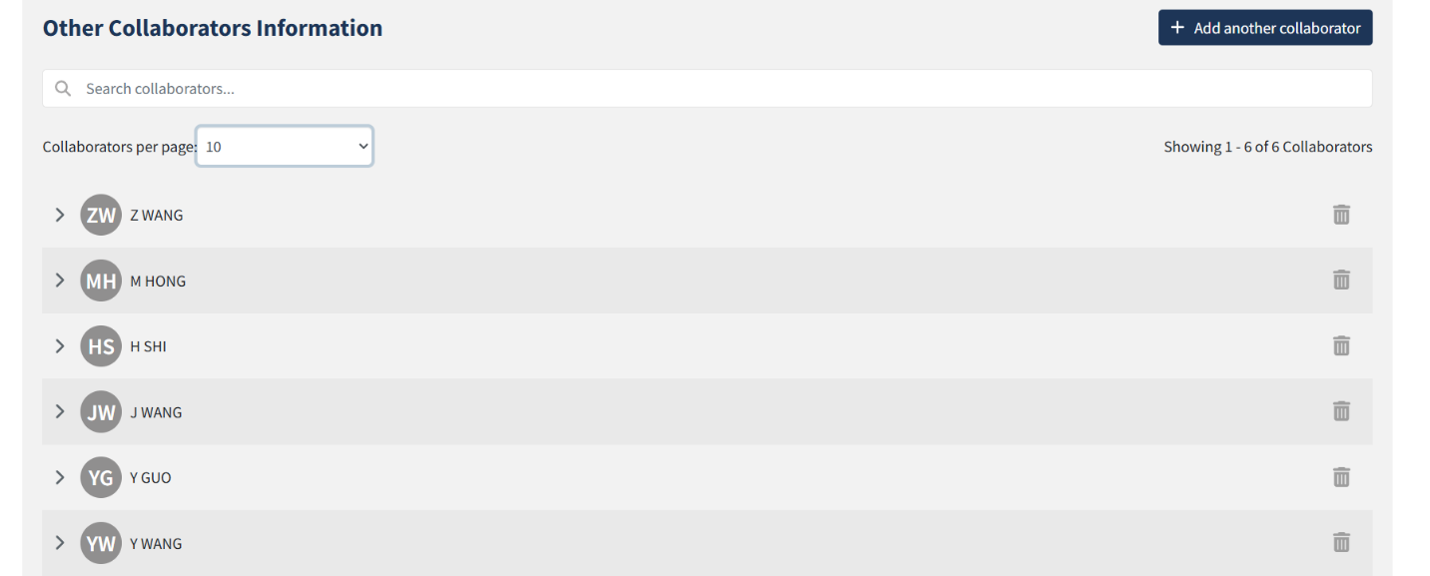
- Full collaborators list is being added to KU imported grants information and in the process of getting roles and ordering set up
- A page (2b) has been added to the Activities training PDF on AIRE's Faculty Insight Resources SharePoint site to highlight the new Smart Import feature (the copy/paste from an external document to create records function).
- Year and date columns are now in the same place in the ‘Manage Your Records’ view. Below are the sections that were updated:
- Professional Performance
- References to my Work/Interviews
- Grants - Funded
- Grants - Proposal
- Other Publications
- Courses Taught Summary
- Directed Student Learning
- Student Achievements
- Also in the ‘Manage Your Records’ view, a column for Position/Role has been added to Professional Service and Public Service sections.
- In Student Mentoring, the ‘Comments’ field has been relabeled as ‘Description’ to be consistent with other sections in the tool.
- ‘Highest Degree Earned’ field was removed from the Edit Profile section, and degree data in a faculty profile can be added to the web profile by clicking “Add to KU Web Profile” in the Degrees section.
- Fields in the Edit Profile tab that can be linked to faculty web profiles and/or Experts at KU have new descriptive text reading, “Displays on integrated KU web profiles (KU Lawrence and Edwards Campus faculty),” “Displays on Experts at KU,” or “Displays on integrated KU web profiles and Experts at KU.”
- In progress: adding the ability to display Research Interests on the faculty member’s web profile page.
- In progress: adding descriptive text to Community Engaged Activity in each appearance in the tool: A community engaged activity is one that refers to a collaboration or partnership between institutions of higher education (students, faculty and/or staff) and the larger community (local, regional, national, or global) for the mutually beneficial exchange of knowledge and resources.
- The URL field was updated to include more flexibility in formatting, creating fewer errors when generating reports.