
Faculty Insight for Activity Reporting
KU Faculty Insight is an activity management tool, developed for faculty to track, manage, and report on research, teaching, and professional achievements. Faculty Insight also connects faculty to research and award opportunities and collaborations.
KU Faculty Insight for Activity Reporting
KU Faculty Insight for Activity Reporting is the portion of Faculty Insight that allows faculty to enter and report on their professional activity. Pre-populated data from publicly available sources populates into new faculty profiles during their first semester at KU. Faculty should check their Faculty Insight profile to ensure accuracy and manually add any activity that is not pre-populated. Keeping accurate records of faculty activity and achievements is important and necessary for KU in order to comply with activity reporting requirements for all Regents institutions.
KU Faculty Insight for Activity Reporting Frequently Asked Questions
By accurately reporting faculty achievements, faculty can easily generate editable reports to produce comprehensive CVs, annual evaluation CVs, and promotion & tenure CVs. Creating a habit of entering your activity annually, at a minimum, will keep all your productivity in one place, where you can easily access it for faculty reviews and scholarly connections.
Beginning with the 2025-2026 calendar year and continuing annually, the Kansas Board of Regents requires each campus to submit a faculty workload report, covering the two prior academic years. The annual report has two primary purposes:
- To illustrate the breadth and variety of faculty activities and how these activities contribute to students, the university’s mission, the state, and society at large.
- To establish a system-wide level of transparency and accountability for how faculty allocate their work time.
In order to accurately report faculty achievements, all tenure line faculty and librarians, teaching professors, professors of the practice, and unclassified academic staff (research professors, clinical professors, curators, specialists, scientists), should utilize KU Faculty Insight to enter, store, and organize career achievements.
Faculty activity for calendar years 2025 and 2026 (January 2025 through December 2026) should be entered into KU Faculty Insight for Activity Reporting no later than March 1, 2027.
In the years following, we will require all faculty to update their activities by the final Friday of January, annually. Submitting all activities by this date not only gives the Office of Faculty Affairs enough time to extract faculty productivity for its report to KBOR, but also keeps your record up to date for annual reviews if you choose to use KU Faculty Insight to generate your annual evaluation CV.
The Office of Faculty Affairs will periodically run department/unit level reports to share with unit leaders about the data that has been entered into the system up until the reporting deadline.
KU will report faculty workload and activity to KBOR annually for the previous calendar year. Individual faculty activity data is not reported; only aggregate data for the entire university is reported.
All KBOR institutions are required to provide the same annual report. Providing accurate KU faculty activity data ensures our report is accurately benchmarked among our peers.
To ensure your record is as accurate as possible, faculty should check for existing records and update Scholarship, Creative Works, Teaching & Mentoring, Service, and Awards and Honors in the Activities section of Faculty Insight. You may also update your Career information if you would like to have a more robust portfolio.

Some publications, awards, grants, patents, and clinical trials may already be pulled into your activity from publicly sourced information. If you have imported records, please check and edit them for accuracy.
KU Faculty Insight for Activity Reporting also creates reports from your faculty activity data, specifically for Annual Reports and Promotion & Tenure. In the Reporting tab, you have the option to create these reports, which download as editable Microsoft Word documents, for you to use in your evaluation process without the need to create a new CV from scratch.

KU Faculty Insight also offers the ability to search for collaborative, funding, and honorific award opportunities. Located in the My Profile tab within KU Faculty Insight are four tabs that allow you to explore these opportunities: Related Terms and People, Suggested Funding, Suggested Awards, and Collaborations. Using your Research Keywords (located in the Edit Profile section), these respective tabs contain a list of related scholars doing work in related areas, thousands of open funding opportunities, honorific award recommendations, and a visual diagram of scholars you have collaborated with. Searches can be saved in your profile for easy reference at a later date.

Smart Import is a new AI tool that has been developed within the Faculty Insight tool to help faculty quickly create activity records from existing content. Instead of manually entering activity information field by field, users can paste content from a CV, citation list, webpage, or other source. Smart Import uses AI to identify activities and map information into the appropriate fields for review before importing.

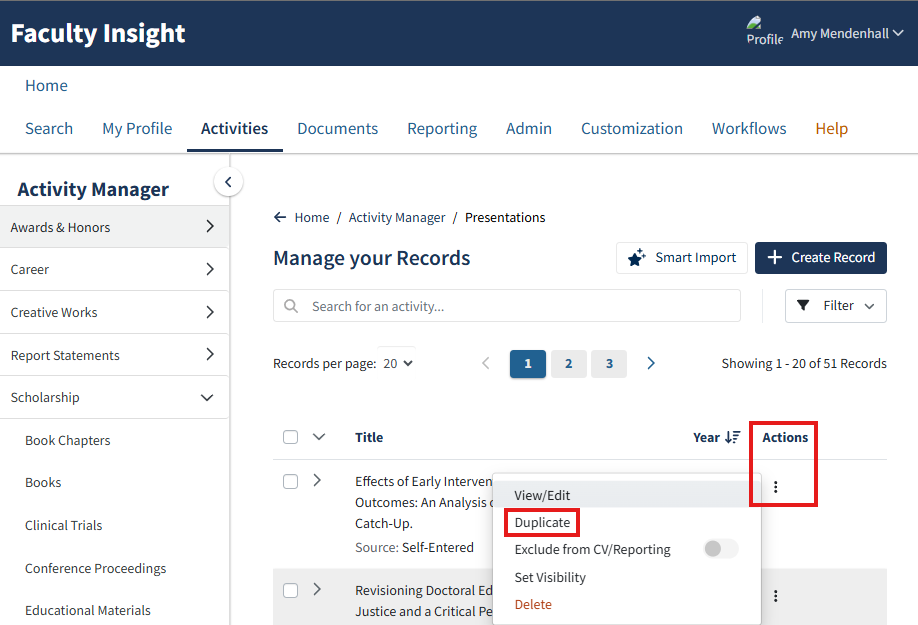
The Duplication feature allows faculty to duplicate a record instead of starting from the beginning when entering similar works into the the Activity Manager.
Units define their own guidelines for faculty productivity in their workload and evaluation policies. If you have questions about faculty activity definitions and were to place a certain activity within KU Faculty Insight for Activity Reporting, please refer to your unit's policies.
Please reach out to facultyaffairs@ku.edu if you have general questions about reporting. For technical questions about KU Faculty Insight for Activity Reporting, you may email AIRE-help@ku.edu.
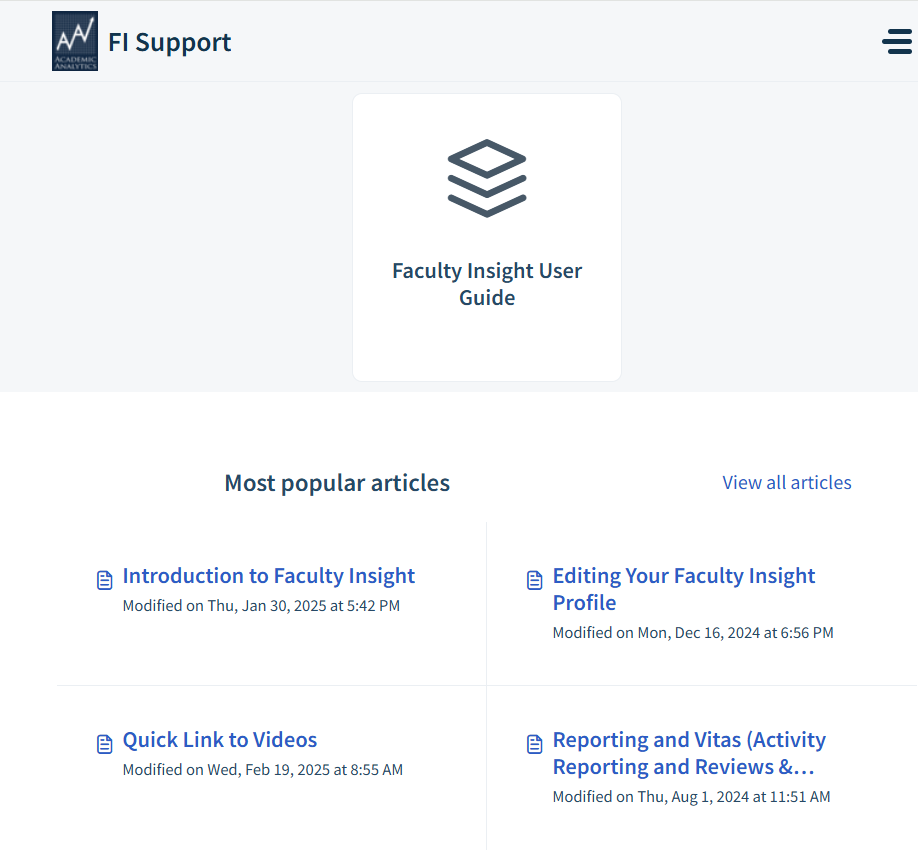
KU Faculty Insight also offers support through the Help tab on the Faculty Insight menu.

Academic Analytics imports many publications, awards, grants, patents, and clinical trials for you through publicly available sources. Additionally, KU uses Streamlyne and Financials in the Cloud (FITC) to import grant information, courses taught, and student committee service. Please check these items in your profile for accuracy and completeness.
Deans, associate/assistant deans, chairs, and academic program directors have access to faculty activity data that is imported through KU systems and publicly available sources. This data can be used to identify unit research strengths and areas for growth and facilitate faculty recognition.
Additionally, KU Faculty Insight activity data connects to Experts at KU — a public-facing online directory that helps people find University of Kansas faculty members and researchers based on their specific areas of knowledge and study. Experts at KU promotes your work to both scholarly and public audiences and helps communicators identify research projects to highlight as part of communications strategies.
Faculty have the option not to share certain activities with Experts at KU through KU Faculty Insight for Activity Reporting by setting record visibility to "private".


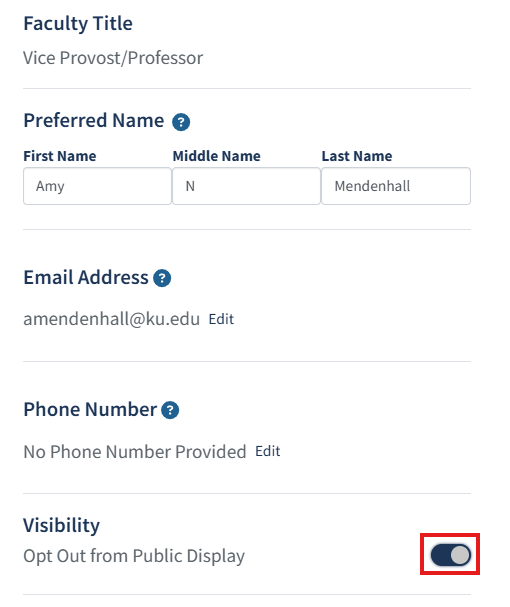
Additionally, faculty can opt out of public display completely, removing them from the Experts at KU site. To do this, navigate to the name at the top right corner of the KU Faculty Insight page and select Edit Profile. From there, toggle Visibility to Opt Out from Public Display (button will slide from gray to navy).

Learn more about KU Faculty Insight
Analytics, Institutional Research & Effectiveness (AIRE) works with Academic Analytics (the developer of Faculty Insight) to continually improve the tool and answer user questions. They've developed a repository of resources to help faculty better understand KU Faculty Insight for Activity Reporting and how it can best support faculty. The Office of Faculty Affairs partners with AIRE to develop personalized trainings and resources for faculty.
Quick Guides
Questions?
Please reach out if you have any questions about reporting requirements or entering your activity. We are here to help!

Upcoming KU Faculty Insight for Activity Reporting workshops
